
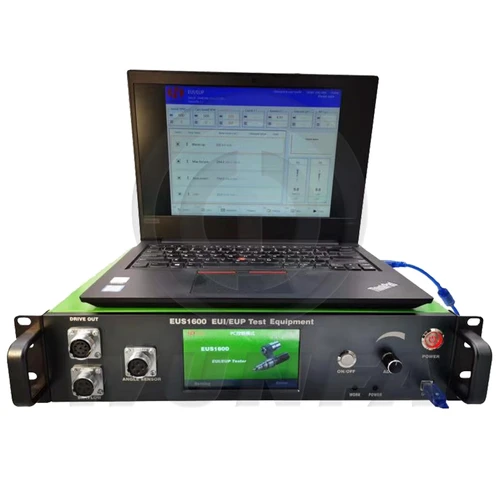
1. Product Information
EUS1600 EUI&EUP Tester Instruction

2. Function Introduction
EUS1600 can be connected to a laptop for testing.
It can also be operated with its own touch screen.
1. Support all types of EUI/EUP tests (test plan can be added and edited)
(Including electromagnetic, piezoelectric, double pulse M11, double solenoid valve dephi E3,HPI X15,QSK60)
2. Support hall, magnetoelectric, encoder cam signal input;
3. Support BiP signal input and display (need BiP sensor and adapter);
4. Support flow sensor signal input and display;
5. Injector resistance, inductance, or capacitance can be measured (standard data can be added);
6. It can drive an electromagnetic injector or a piezoelectric injector (Built-in more than 3,500 standard data);
7. IQA coding ofthe common rail injector can be generated (optional).
8. Support common rail injector opening pressure/opening pulse width test, single injection test;
9. Support the AHE lift test of the common rail injector.
10. It can drive the CAT HEUI injector (built-in test plan);
11. The drive current and voltage of the injector are settable.
12. The drive waveform can be displayed (the same as the waveform measured by the oscilloscope);
13. More than a dozen language interfaces are available;
14. It can be remotely assisted on the Internet and can be upgraded with one key.
15. Standard 2U chassis design, high-grade aluminum alloy panel, with fixed ears, easy to fix to the cabinet.
3. Interface Description
3.1 Drive Out 4 pin
|
Pin Number |
Features |
Colour |
Whether to Connect |
|
1 |
Drive Common |
Black |
Yes |
|
2 |
Injection Solenoid |
Red |
Yes |
|
3 |
Drive Common |
Black |
Yes |
|
4 |
Timing Solenoid |
Red |
Yes |
3.2 Flow Signal and BIP Signal Input 5 pin
|
Pin Number |
Features |
Colour |
Whether to Connect |
|
1 |
BIP DC 5V |
|
Yes |
|
2 |
GND |
Blue |
Yes |
|
3 |
BIP Signal |
|
Yes |
|
4 |
FLOW Signal |
Black |
Yes |
|
5 |
Flowmeter DC 12V |
Brown |
Yes |
3.3 Cam Sensor Signal Input 7 pin (Magneto, Hall, Encoder)
|
Pin Number |
Features |
Colour |
Whether to Connect |
|
1 |
GND |
Black |
Yes |
|
2 |
DC 5V |
Red |
Yes |
|
3 |
Encoder A |
White |
Yes |
|
4 |
Encoder B |
Yellow |
Yes |
|
5 |
Encoder Z |
Green |
Yes |
|
6 |
Hall signal |
|
Yes |
|
7 |
Magneto Signal |
|
Yes |
3. Operating Instructions
Panel layout

a. 5-inch color touch screen, can test common functions;
b. ON/OFF, ADJ button can cooperate with touch screen operation;
c. POWER: power switch;
d. USB: Connect to a notebook computer for testing.



Reviews
There are no reviews yet.