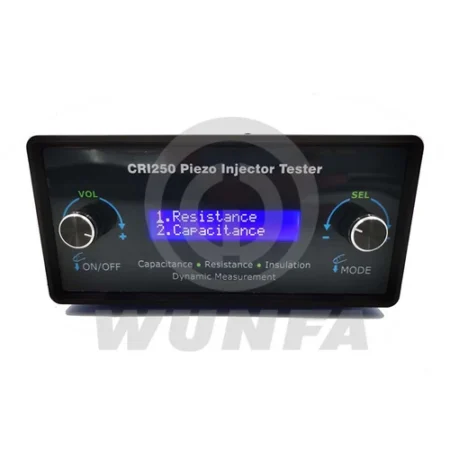
wunfa logo
WUXI WUNFA

CRS300 Common Rail Tester

1. Six electromagnetic injectors and one piezoelectric injector;
2. With a counting function, you can control the counting solenoid valve.
3. One-way ZME drive;
Support test Bosch, Denso, Delphi common rail pump, HEUI pump,
4. Open loop / closed loop control pressure;
5. 5.7-inch display.

1. Outline

1.1 Outline

CRS300 high pressure common rail system controller function is to mimic the diesel engine ECU (Engine Control Unit), While providing Bosch, Delphi, Siemens and other common rail system control signal to drive the high-pressure common rail injector and Common rail pump to work, drive signal parameters can be carried out by the user according to their actual situation, and can be saved grouped for easy maintenance personnel to high-pressure common rail injector in working condition to judge different conditions and maintenance。

1.2 Features

1. Support the Electromagnetic injector and Pizeo injector;
2. Supports up to six electromagnetic injectors;
3. Support for multiple rail pressure sensors;
4. Intelligent PID algorithm, the pressure control is more precise;
5. The software and hardware double short-circuit protection, Run Safer.
6. Multi-language selection, Chinese/ English/ Russian;
7. Security is designed to prevent operator misuse, use more secure;
8. Customizable boot LOGO;
9. According to customer demand for customized software interface, operation, chassis appearance;

1.3 Security

To ensure safe operation, please follow the following rules

1. In the course of operating the tester, the operator should wear safety glasses.
2. Using a separate dedicated outlet and reliable grounding. The tester is a three-wire power cord plug connected to a standard three-wire outlet. Please ensure reliable grounding.
3. If the power supply voltage is unstable, please connect the power supply voltage tester uses;
4. Regularly check the AC power cord for damage, and the power plug or power outlet for dust accumulation;
5. If the tester’s abnormal conditions occur, or an abnormal sound or smell, or the tester can not be hot to the touch, stop using it immediately and unplug the AC power outlet, power cord, and all other cables.
6. If the tester fails, please contact the service personnel to obtain necessary assistance.

1.4 Use and maintenance

1. Do not throw, drop, or step on the tester; the tester should avoid being subjected to a strong external impact.
2. Do not insert foreign objects into the connector portion of the tester.
3. Do not allow water or other liquids to flow into the interior or on the tester;
4. Do not touch with wet hands the AC power cord terminals.
5. Do not let dust or foreign matter accumulate on the terminals around the AC power; the accumulation of dust and foreign matter may cause a fire or electric shock.
6. Avoid stepping on or pinched AC power cord.
7. Unplug the power cord when cleaning the tester.


2 Accessories and Interface Description

2.1 Wire of the Injector

Pin Number

Function

Colour

Whether Connecting Wires

1

Common

Black

Yes

2

Injector 1 drive

Red

Yes

3

Injector 2 drive

Red

Yes

4

Injector 3 drive

Red

Yes

5

Injector 4 drive

Red

Yes

6

Injector 5 drive

Red

Yes

7

Injector 6 drive

Red

Yes

2.2 Wire of the pump

Pin Number

Function

Colour

Whether Connecting Wires

1

Proportional Valve

Red

yes

2

Proportional Valve

Black

yes

3

Pizeo +

Red

yes

4

Pizeo –

Black

yes

5

Empty

no

6

Injector 5 drive

Red

Yes

7

Injector 6 drive

Red

Yes

2.3 Wire of Rail Pressure Sensor


Pin Number

Function

Colour

Whether Connecting Wires

1

Relay close

yellow

yes

2

Relay common

Black

yes

3

Relay open

Red

yes

4

empty

no

3 Operating Instructions

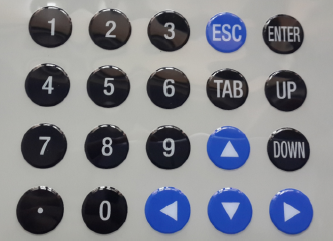
3.1 Keyboard Layout
f6d91783cf2e41b3c5307f31d13f907.png
3.2 Basic Operation

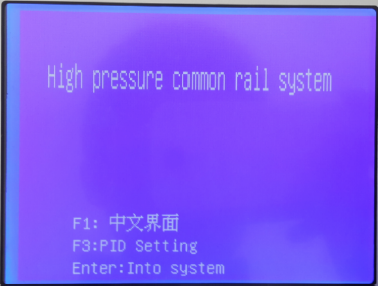
1. Power on,
The startup screen displays the following:
Press the function key to set the appropriate parameters,
Left and right arrows to move the cursor, up and down arrows to change the value,
When you modify a parameter, the test page’s lower right corner diamond is solid, the setting is complete, and you press Enter to confirm. The diamond becomes hollow.4812fa8130769e7593b9b3d2f0bdcc7.png

F1 Chinese, English, and Russian language switching;
F3 PID settings; ENTER to enter the test page;

2. Press the F3 key to enter setup
Divided PID parameter setting pressure sensor set/ two parts

PID parameter settings:

F0: Select the common rail pump, corresponding modification PID parameter values;

F1: Set scale value, the reference value: 0.5;
F2: Set the integral value, reference value: 0;
F3: Set differential value, the reference value: 6;

A pressure sensor is provided:

F5: zero value
BOSCH sensors: 0.44
Denso sensor: 1.04

F6: full-scale value
BOSCH sensors: 4.04
Denso sensor: 3.65
The above values are reference values that can be set according to the actual situation. Press ESC to return to the main interface.

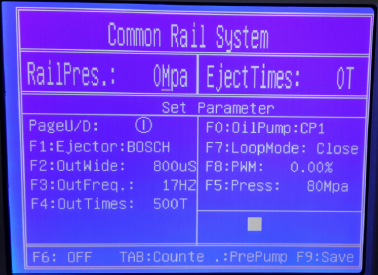
3. Press ENTER on the test page

f0c0132623a3081267d1e90f1fb7b44.png

PageU / D: Select the parameter list you can save 10 groups of data.

F1: Select injectors, continuously press F1 to select BOSCH / DENSO / DELPHI / PIZEO / DENSO 84 kinds.
PIZEO for optional functions;

F2: Set the pulse width, enter a number, or use the up and down arrows to select.
The setting range is 0 ~ 3000uS;

F3: Set the frequency, enter a number, or use the up and down arrows to select.
The setting range is 1~30Hz.

F4: Set the count of the number of times, enter a number, or use the up and down keys to select.
The setting range is 0 ~ 65000T;

F6: Start testing and stop the test. Continuously press F6 to select.

Note: Before starting the test, you need to check the following:
1. Set the parameters for the pump type control mode/ set pressure;
2. the initial value of the current PWM;
3. the controller of the current speed value;
4, the supply of oil and backup oil to form a stable circulation;

TAB: start and stop counting, continuously press the TAB key to select.

F0: Select the pump model, and continuously press F0 to choose.
Supported pumps have: CP1, CP2, CP3, JER, HP3, HP4 ;

F7: Select control mode, the open-loop and closed-loop, continuously press F7 to select.
Under the open-loop mode, press the UP and DOWN keys to change the PWM value,
Under the closed-loop mode, press the UP and DOWN keys to change the pressure value,

F8: Sets the initial PWM value,
The setting range is 0 to 100%.

F5: set pressure value,
The setting range is 0 ~ 160Mpa.

F9: Save the current parameters;

Dynamic adjustment:
Press F6 system startup, you can dynamically adjust the width frequency / set pressure value, as follows:
“Left” and “right” Arrowto adjust the pulse width value;
“Upper” and “lower” arrows to adjust the frequency value;
“PgUp” and “PgDn” to adjust the set pressure value or PWM value.

4 About Maintenance Responsibility

1. Under normal use, due to product quality issues, free repair within one year.
2. Due to the non-normal use, causing damage to the product, the user bear themaintenance costs;
3. The product’s life-long maintenance, a year later, users bear the maintenance costs.

Reviews

There are no reviews yet.

Be the first to review “CRS300 Common Rail Tester”

Your email address will not be published. Required fields are marked *


Scroll to Top